What is Backcom XM?
Backcom (Back Commission) is a trading fee rebate program that forex brokers apply to their traders through the broker’s Partners (IBs).
Backcom XM is the trading fee rebate program applied to traders who are trading on XM. With Backcom XM, traders can receive back a portion of the trading costs (including spread costs and commission fees) paid to XM when the trader generates trading activity, through an IB that has an automatic cashback feature. Currently, Backcom101.io is one of XM’s highest-tier partners; when traders register to receive backcom under Backcom101.io’s IB code, they will be applied the current highest rebate level, which is 100%.
Why should you receive Backcom XM 100%?
There are 2 reasons why traders should register to receive Backcom XM 100%.
First, Backcom XM 100% helps traders save on trading costs
When trading forex, traders have to pay the broker a trading cost, including spread and commission. For example, if a trader trades 1 lot of gold on XM’s Standard account, the trader has to pay 27$ in spread fees (because this account does not charge commission). If the trader registers to receive backcom under a VIP-tier IB, the trader will be refunded 13$. Clearly, backcom helps traders save nearly 50% of trading costs. If you trade large volume such as 5 lots, 10 lots per day, the backcom received will be very large. With this backcom money, traders can add it to capital to continue trading or withdraw it depending on their needs.
Second, backcom does not affect any other aspects of the trader’s XM account
Backcom works like a promotional program: when trading activity occurs, the trader’s account is automatically credited with an amount of money, similar to a new deposit transaction. Backcom does not affect spreads, does not widen spreads, does not affect order execution, and does not affect any other aspects of the trader’s XM trading account or XM personal area account. Receiving backcom means the trader is receiving a bonus, a benefit that XM offers to the broker’s customers. If the trader does not receive backcom, that money will be taken entirely by the broker and the IB.
Therefore, there is no reason why traders should not receive Backcom XM 100%; on the contrary, any traders who have not registered for Backcom XM 100% should register right now to save trading costs as soon as possible.
How to receive Backcom XM 100%
For traders who already have an XM account, to receive Backcom XM 100%, you must open a new trading account ID.
Method 1: Open a new trading account ID.
For traders who have registered an XM account, are trading at XM, but have never registered to receive Backcom XM 100%, you will open a new trading account ID to trade. Backcom XM 100% will start being calculated on this new trading account ID; the old trading account IDs from before will not be eligible for backcom.
Step 1: Log in to the XM Personal Area

Step 2: Open an additional new trading account
In the Account Overview section, click the Open an additional account button.

Step 3: Choose the trading platform and the trading account type

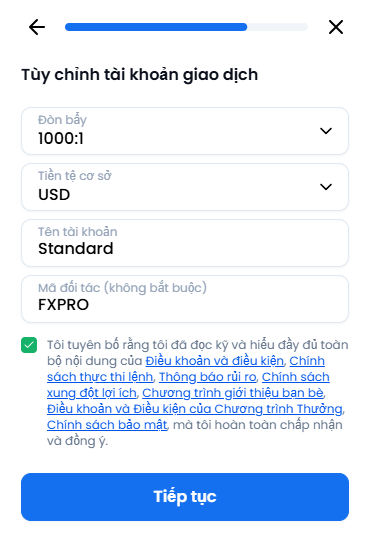
Step 4: Set up the account and enter Backcom101.io’s IB code to receive Backcom XM 100%.
IB code: FXPRO
Step 5: Create a password for the new trading account ID

Step 6: Confirm the Backcom XM program again

That’s it—you have registered to receive Backcom XM 100% for this newly opened trading account. At this point, you can transfer funds from the old trading account ID to the new trading account ID, or deposit funds into the new account to trade and start receiving Backcom XM 100% automatically every day.
If you want to open additional new trading account IDs, do the same and remember to enter the IB code: BH8PQ in the Partner code field during account setup to receive Backcom XM 100%.
As for traders who do not yet have an XM account and have not traded on XM, you will open a new XM account.
Method 2: Open a new XM account.
Step 1: Click the Get Started button on the website xm.com

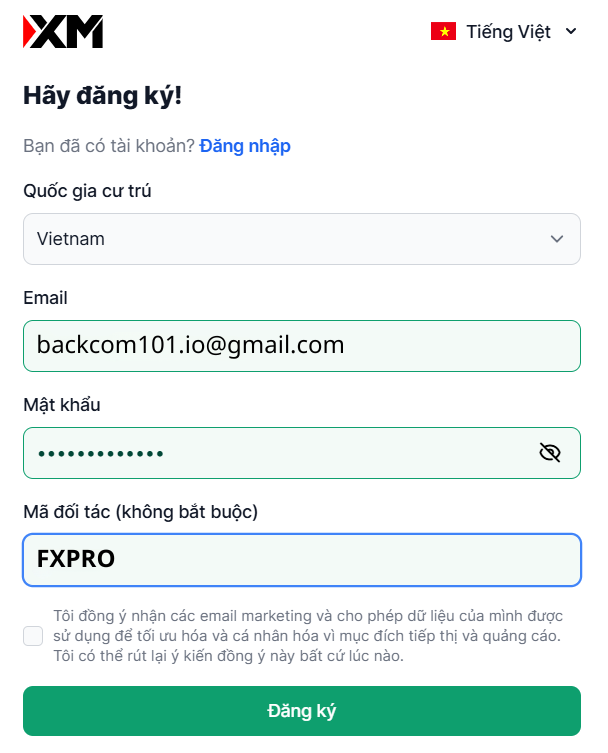
Step 2: Enter your XM account registration information
Fill in your email, create an account password, and enter the IB code: FXPRO in the Partner code field. Then click Register.
Step 3: Complete all account verification steps
Step 4: Deposit funds into the pre-created account or open a new trading account ID

With this method, your XM account has been registered to receive Backcom XM 100% automatically. From this point on, when opening additional new trading account IDs, you will not need to enter an IB code anymore, and backcom will still be credited to the account when trading activity occurs.
Conclusion
Besides reducing trading costs, even if you trade at a loss, there will still be an amount of money credited to your account, helping you have more capital to trade. Moreover, by choosing to register to receive Backcom XM 100% under the VIP partner Backcom101.io, you will be supported by Backcom101.io’s team with other issues such as deposits/withdrawals, trading on XM, and trading knowledge and experience from team members who are long-time traders. Therefore, from now on, claim all of these benefits by registering to receive Backcom XM 100%. During the registration process, if you have any questions, you can contact Backcom101.io via the following contact information:
ZALO: 0868933361
Telegram: @Vietnd91